API
Connect DINQ's talent search capabilities into your systems and tools via API.
DINQ's API lets you connect talent search and profile enrichment to your internal tools, ATS, recruiting workflows, or custom agent systems.
Use the API to:
- Trigger talent searches from your own product or workflow.
- Pull enriched candidate profiles into your pipeline.
- Add contact retrieval to outreach workflows.
- Run talent mapping across a skill cluster, company, research area, or market.
- Connect DINQ to AI workflows or custom agents.
What you can build
- ATS integration: Push enriched candidate data, public signals, and profile links into your applicant tracking system.
- Custom recruiting tools: Embed DINQ's natural-language talent search into internal dashboards or sourcing workflows.
- Talent market mapping: Analyze talent density across technical niches before opening or scaling a role.
- Agentic workflows: Use DINQ as a search and enrichment layer inside AI assistants or automated workflows.
API endpoint
POST https://api.dinq.me/v2/people/searchSearch parameters
| Parameter | Required? | Description |
|---|---|---|
query | Required | A natural-language search string describing the ideal candidate profile. |
limit | Optional | The number of profile results to return. Default: 10. Max: 100. |
time.active.from, time.active.to | Optional | Active-time range in ISO date-time format. Playground converts the 30-day, 180-day, and one-year presets to actual dates. |
sources | Optional | Source array: github, huggingface, company, scholar, or linkedin. |
The interface's Professional source uses linkedin in the request, not professional. Active time is not a top-level active_time field.
Request example
curl -X POST https://api.dinq.me/v2/people/search \
  -H "Authorization: Bearer YOUR_API_KEY" \
  -H "Content-Type: application/json" \
  -d '{
    "query": "AI infrastructure founders in San Francisco",
    "limit": 10
  }'
Active time and workspace context
For example, restrict sources and request a recent activity window with:
{
  "query": "AI infrastructure engineers",
  "limit": 10,
  "sources": ["github", "linkedin"],
  "time": {
    "active": {
      "from": "2026-10-01T00:00:00.000Z",
      "to": "2026-10-27T00:00:00.000Z"
    }
  }
}
Dates are illustrative; replace them with your actual range. For a team request, also send X-Workspace-ID: YOUR_WORKSPACE_ID. It does not replace the API key or grant access to a workspace you cannot otherwise use.
Playground generates examples for the current space. Copy them again after switching spaces to avoid using the wrong billing context. Python (dinq-people-search) and TypeScript (@dinq-labs/people-search) SDK examples are available for people search; team examples show the required workspace header.
Email lookup API
Choose Profile Email in Playground's API endpoint selector. This is separate from people search and looks up email for one already-identified candidate.
POST https://api.dinq.me/api/v1/scholar/deep-search/profile-email| Field | Description |
|---|---|
name | Required candidate name |
session_id | Session identifier; standalone examples can use an empty string |
company, current_employer | Company and current employer identity hints |
text, useful_info | Role, background, and public evidence context |
sources | A list of url values with optional description fields |
personal_homepage, urls | A homepage or other public URLs |
curl -X POST https://api.dinq.me/api/v1/scholar/deep-search/profile-email \
  -H "Authorization: Bearer YOUR_API_KEY" \
  -H "Content-Type: application/json" \
  -d '{
    "name": "Alex Example",
    "session_id": "",
    "company": "Example Company",
    "sources": [
      {"url": "https://example.com/team/alex", "description": "homepage"}
    ]
  }'
This is a placeholder, not a real candidate or guaranteed result. Returned emails can be empty or null. A new successful lookup costs 20 Credits per candidate; reusable results follow the actual billing record. Failed lookups or those finding no email are not charged.
API Playground
The API Playground lets you prototype and test search requests in the browser.
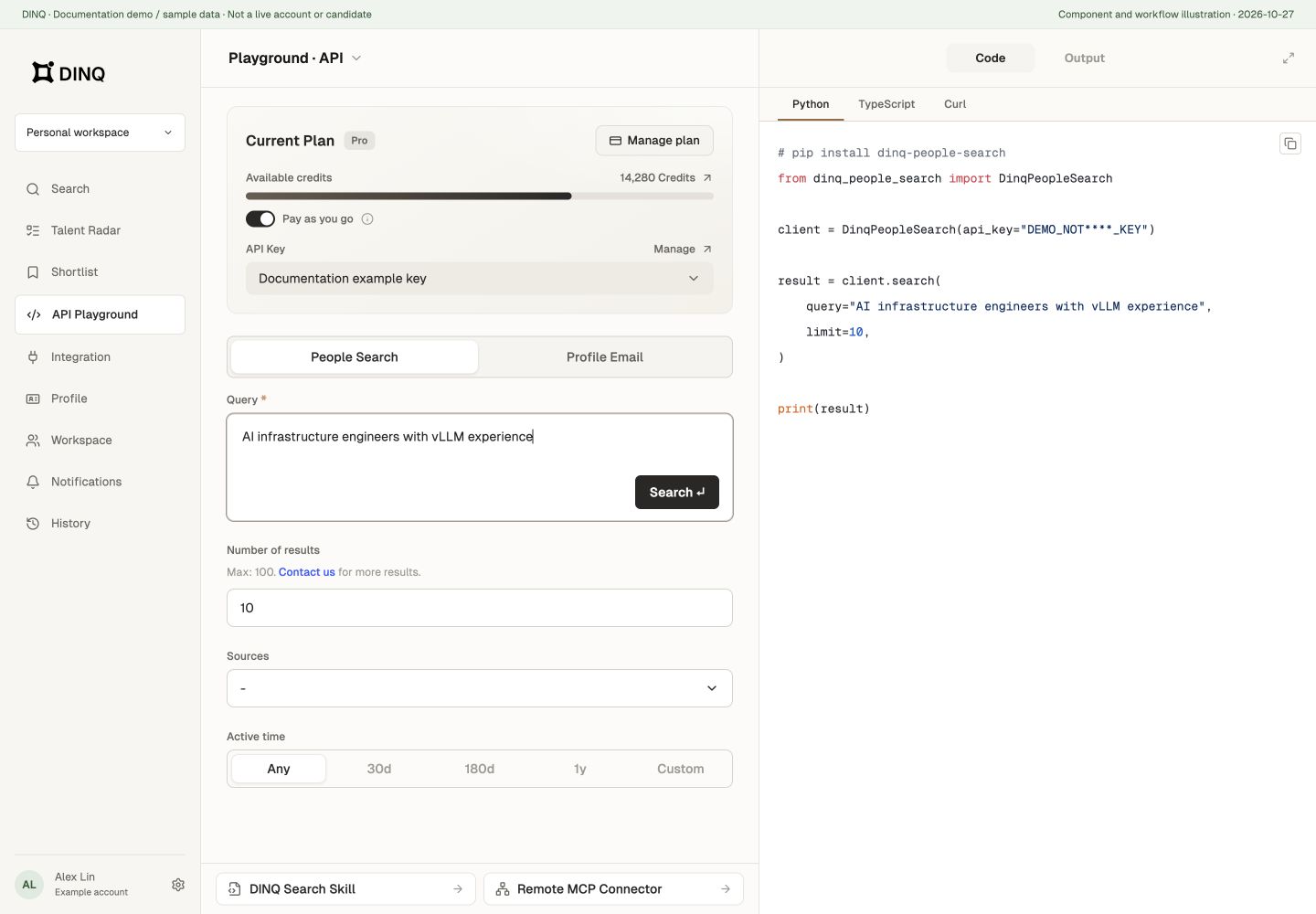
You can:
- Enter a natural-language query and adjust schema parameters.
- Run live test searches.
- Switch between visual candidate cards and raw JSON.
- Copy generated examples for Python, TypeScript, and cURL.
- Switch between people search and email lookup. API, MCP, and Skill are distinct usage modes.
Authentication
Generate an API key from Settings > API keys.
Send Authorization: Bearer YOUR_API_KEY in the request headers. Access also depends on current account or team permissions and available Credits; check the response and subscription page. Having a key does not mean unlimited usage or access to every endpoint.
Playground sends real requests, not free simulations. Search, email, and other operations have their own billing rules; the new search-page profile's 5-Credit fee is not a universal API price. Keep keys confidential.