Enrich
Understand candidate basics, openness to opportunities, L1–L4 seniority, recent activity, and personalized analysis grounded in public evidence.
Enrich is DINQ's candidate profile enrichment and analysis feature. It brings together public experience, work, research, career signals, and recent activity, then uses the current search context to explain fit and suggest recruiting approaches.
An Enrich profile describes the candidate you are researching. It is not your own published Profile, and it is separate from the single-platform workflow in Talent Analysis.
Read an Enrich profile through five complementary kinds of information:
| Analysis | What it helps you understand | What it does not establish |
|---|---|---|
| Basic information | Identity, current affiliation, verifiable experience, and public links | A complete background check or a current CV confirmed by the person |
| Openness to opportunities | Possible openness to new work opportunities based on public signals | A declared job search, reply rate, or probability of accepting an offer |
| L1–L4 seniority | Relative experience and potential scope of responsibility | A verified internal level or pay grade at a particular company |
| Personalized dynamic analysis | Analysis tailored to talent category, search context, and available evidence | One fixed metric template for everyone, or guaranteed continuous real-time updates |
| Recent activity | Recent work, public events, and career changes with available sources | Complete whereabouts, all activity, or real-time monitoring |
Generate and open a profile
- In search results, choose Generate profile in the Profile column.
- Wait for generation, then choose View profile.
- To process several people, select candidates and choose Generate profiles in the toolbar.
- Review fit, career signals, recruiting advice, and sources rather than only the headline score.
This guide describes the new search-page profile. Shortlist and Talent Radar currently use different panels; not every entry point exposes the same fields.
Single- and two-column layouts
Enrich can display the same candidate's profile in one or two columns. This is a change in presentation as the panel width changes, not a comparison of two people. Switching layouts does not regenerate the profile or add a generation charge.
- Single column: A narrow panel stacks basic information and analysis vertically. Scroll down to continue reading.
- Two columns: With sufficient width, the left column contains identity, role, affiliation, summary, match, education, and experience. The right column contains track record, career status, openness, and recruiting advice. Recent activity and sources remain further down the left column.
- Switching: Use the Widen panel / Narrow panel icon at the top right on desktop. The actual column count still depends on available width; a narrow screen does not force two cramped columns.
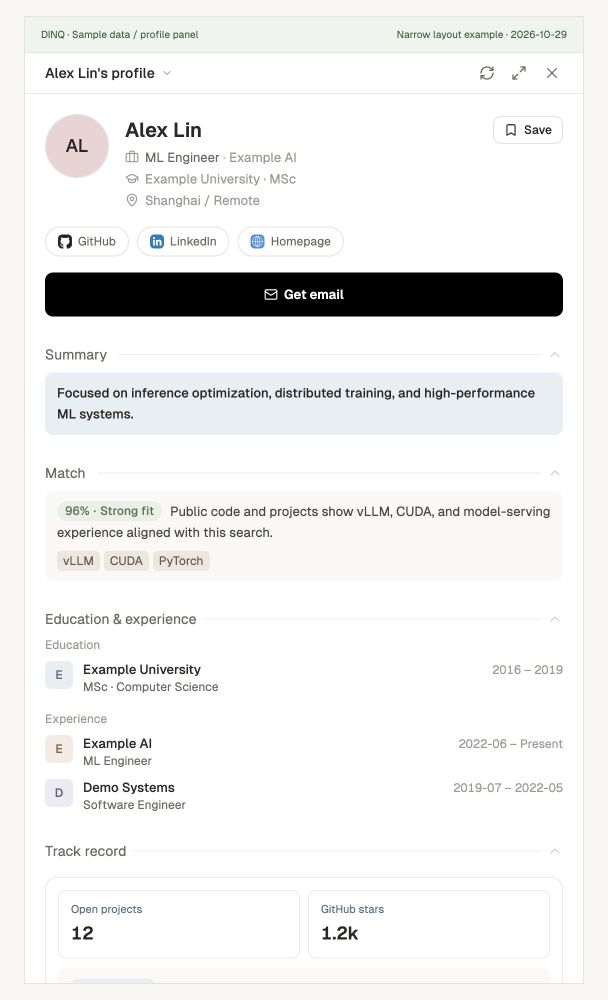
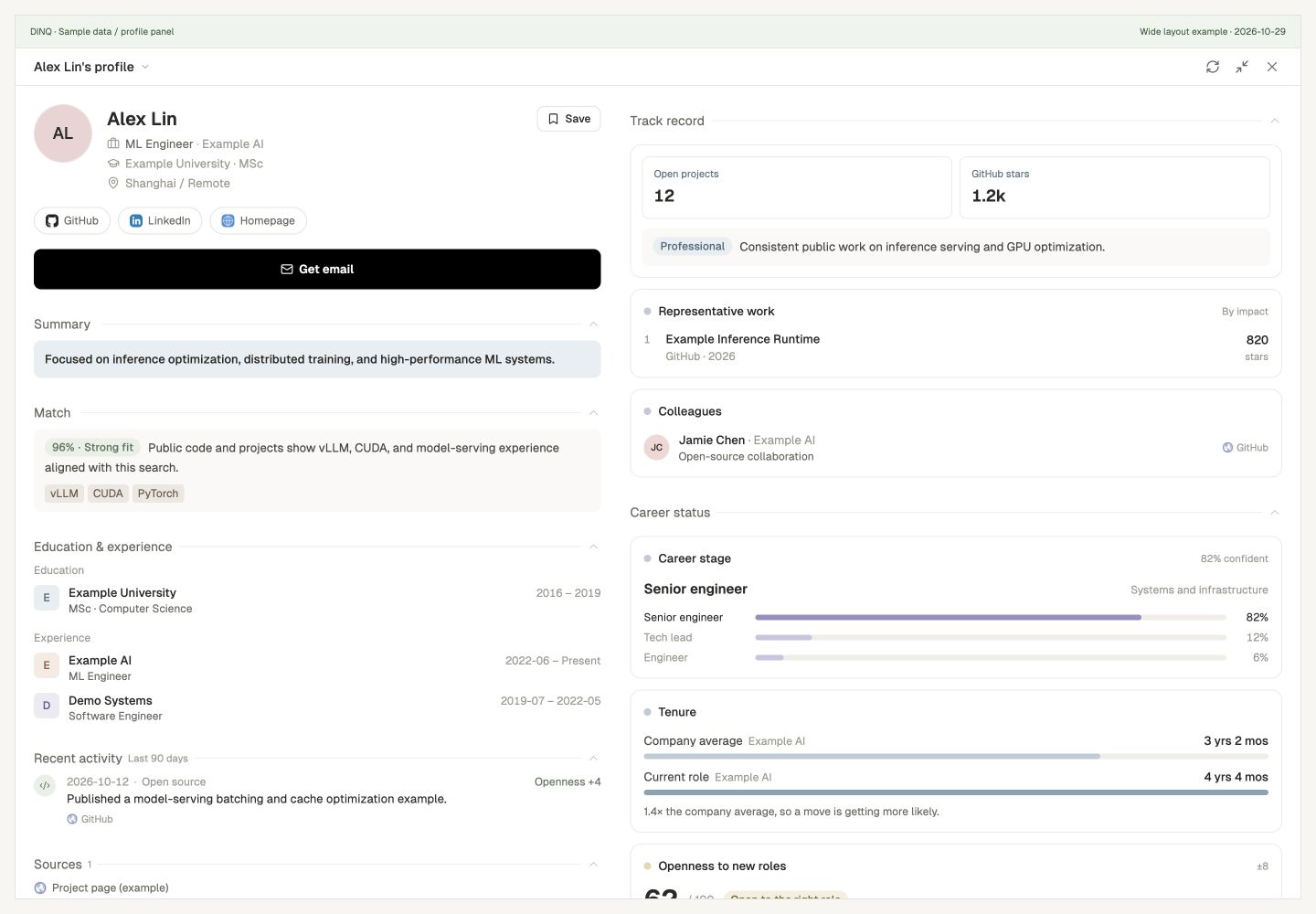
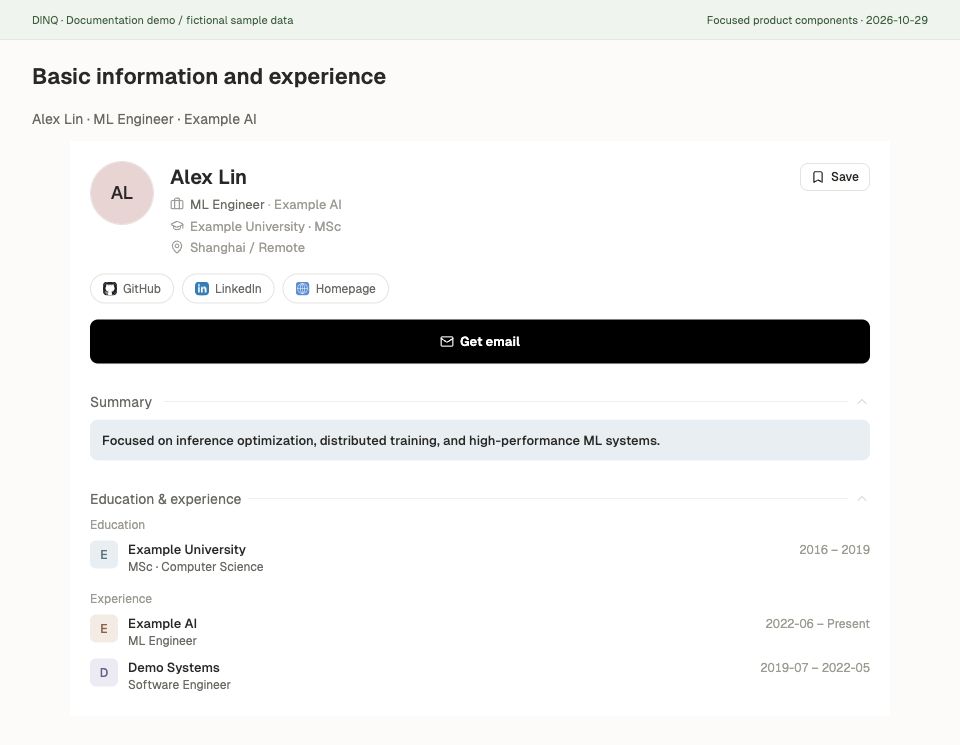
Basic information: confirm the person's identity
The top of the profile helps you establish who you are reviewing before reading the analysis. Public coverage differs by person; unavailable fields may remain empty or use a neutral placeholder.
| Information | What it represents | What to check |
|---|---|---|
| Photo and name | Name, an available local-language name, and photo; initials may appear without a photo | Confirm affiliation, experience, and public profiles rather than relying on a photo or shared name |
| Current role and affiliation | Role, company, laboratory, or other organization in available public records | Open the original professional or organization page and check for changes |
| Highest degree and location | Available school, degree, and public location information | Location is not a job-location preference; missing education does not establish that no degree exists |
| One-line summary | A generated overview of background, specialization, or representative work | Read it alongside the detailed experience and evidence |
| Public platform links | Available GitHub, LinkedIn, Scholar, personal site, and other links | Verify identity and actual work; a link does not mean its owner authorized DINQ to sign in to that account |
| Education and work history | Available schools, organizations, degrees, roles, and dates | Check chronology, overlapping roles, and current employment; public records may be incomplete |
Basic information answers who the person is; Match explains possible relevance to the current request. A person can have the same history but different fit explanations for different roles.
Data coverage describes how many kinds of information are available in this profile, not factual accuracy, ability, or confidence in a hiring decision. Review Sources and the generation timestamp when verifying details. A recently generated profile does not mean every source was updated that day.
Get email is a separate contact-lookup action. Generating basic information does not automatically find an email or send a message. Billing is explained below; see Outreach for contact workflows.
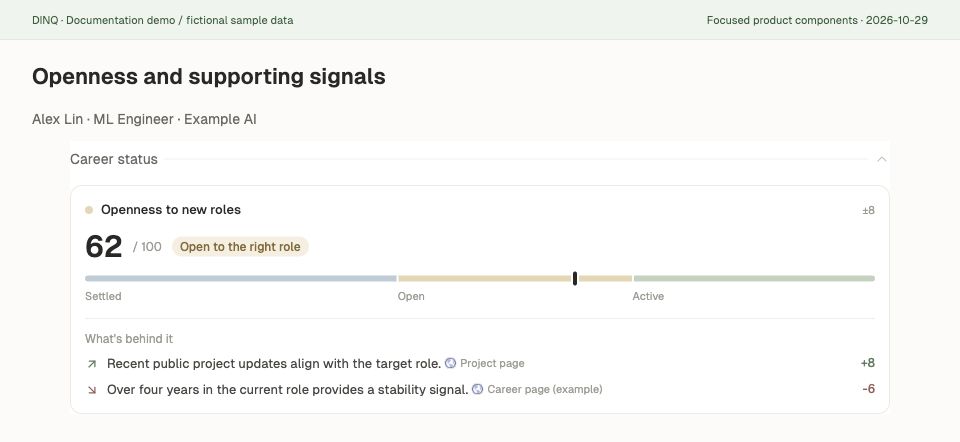
Openness to opportunities
Openness is a model-assessed score from 0 to 100 that helps you explore possible openness to new work opportunities. A higher score suggests that the person's preferences may be worth exploring; it does not mean they have declared that they are looking for work.
| Score | Display band | How to use it |
|---|---|---|
| 0–39 | Settled | Public signals lean toward a stable current situation; consider relationship-building and continued observation |
| 40–69 | Open to the right role | A suitable opportunity may be worth discussing with specific role or collaboration context |
| 70–100 | Active | The model estimates greater openness; still confirm preferences, timing, and conditions directly |
Read the drivers alongside the score. Career stage, current tenure, and recent public events can provide positive or negative signals. Signed impact values help explain the assessment; they are not self-ratings and should not be added together as a formula for the final score.
When shown, ± expresses uncertainty in the estimate, not a guaranteed interval. A score of 80 does not mean an 80% chance of changing jobs or replying. A low score is not a refusal of all contact. Check source dates and confirm preferences through respectful professional communication.
L1–L4 seniority distribution
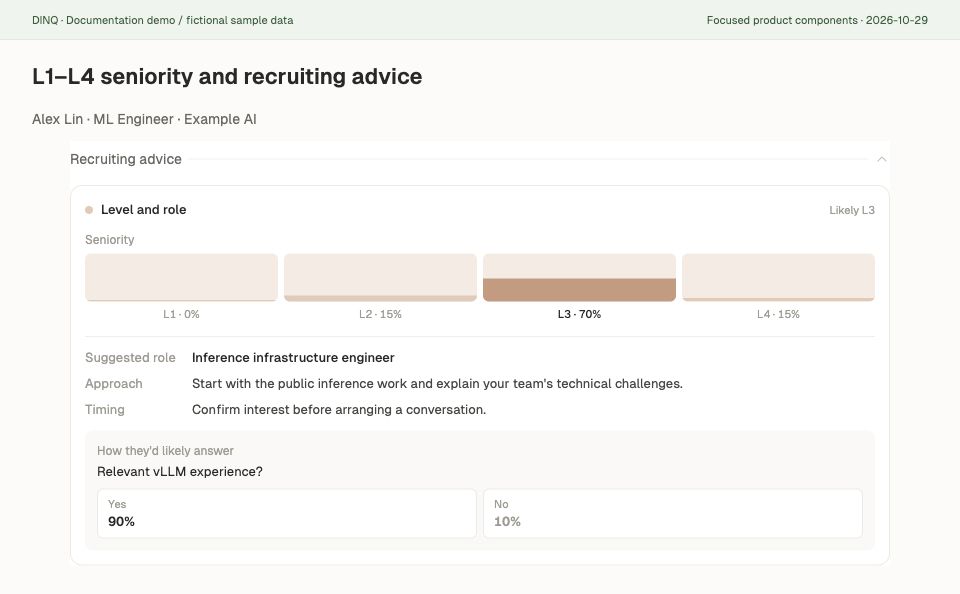
Under Recruiting advice > Level and role, DINQ uses L1–L4 to describe relative seniority and potential responsibility across companies, job titles, and talent backgrounds.
| Level | Meaning | Indicative responsibility |
|---|---|---|
| L1 | Junior / early career | Complete specific tasks with guidance and clear objectives |
| L2 | Mid-level | Independently own a module, part of a project, or research topic |
| L3 | Senior / Staff | Define direction, own core technology, or lead a small team |
| L4 | Expert / Principal | Demonstrate broad field influence and help shape organization-level direction |
These are DINQ's relative seniority bands, not a particular employer's internal levels, and they are not a mechanical conversion from years of experience. Both management and individual-contributor paths can show seniority; a larger reporting team is not required for a higher band.
The profile displays a distribution across L1–L4, not just one absolute label. For example, an illustrative distribution of L3 60%, L4 30%, and 10% across the other levels means the model leans toward L3 while retaining other possibilities. It does not verify the person's current employer level. Close distributions especially call for reviewing project ownership, scope, and actual work.
Read the recommended role, approach, and timing together with this distribution. Do not use a level alone to set compensation, reject a candidate, or replace interviews.
Personalized dynamic analysis
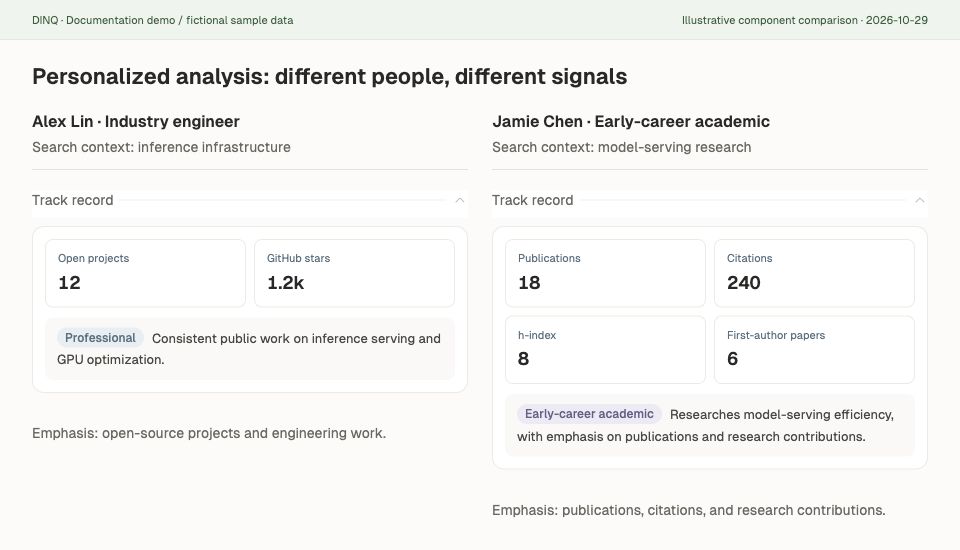
Personalized analysis adapts to each person's talent category, public record, and the current search context. A researcher, creator, and founder should not have to demonstrate their work through the same metric template.
| Talent category | Signals the profile may emphasize |
|---|---|
| Industry professionals | Experience, responsibilities, seniority, tenure, public projects, and colleague or collaboration evidence |
| Creators / KOLs | Content, platform influence and engagement, representative work, and public partnerships |
| Founders | Company and funding stage, entrepreneurial experience, products, and collaboration context |
| Early-career academics | Research direction, papers, citations, academic stage, and graduate or internship eligibility signals |
| Academic faculty | Research output, citations, collaboration networks, and consulting or research cooperation context |
| Frontier-lab talent | Research and engineering work, lab experience, and available talent-movement information |
| People whose public footprint is mainly LinkedIn | Verifiable career history and tenure; missing work or collaboration information stays empty rather than being invented |
Categories organize analysis; they do not rank people's ability. Available evidence determines which fields appear. A sparse public footprint does not mean weaker ability.
Search context also shapes the fit explanation. The same person considered for an inference-engineering role and a developer-ecosystem role may require different evidence and reasoning. Enrich uses the match context and identity hints supplied with the request rather than treating one score as a permanent label on a person.
Dynamic analysis also includes staged enrichment within a generation: additional sources can refine fit explanations, drivers, and recruiting advice. It does not mean every visit starts fresh retrieval or that monitoring runs continuously. Identical requests may reuse cached profiles. For ongoing candidate discovery, see Talent Radar.
Recent activity: understand what happened lately
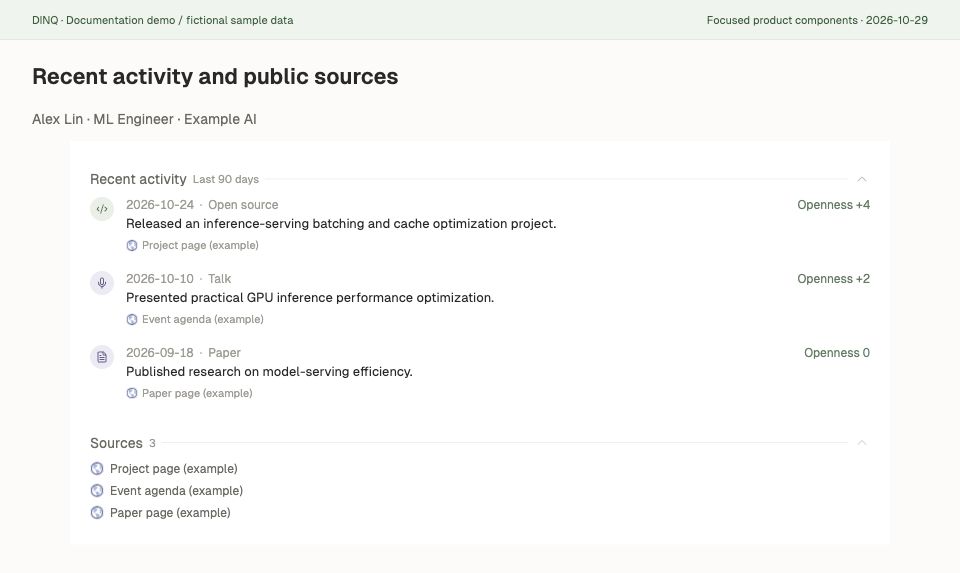
Recent activity organizes available public events from the past 90 days into a timeline. Use it to explore current work, verify context, and prepare relevant outreach. Types include papers, job changes, open-source work, talks, news, social posts, awards, and published content.
Depending on available information, each event shows:
- Date and type: Establish timing and the nature of the activity; an old report is not a new event.
- Summary: A brief description; verify important details on the original page.
- Source link: Open the paper, project, organization announcement, news story, or public post and confirm it refers to the same person.
- Openness impact: Some events show a signed impact value explaining the model assessment. This is not a declared job-search preference or evidence that the event will cause a job change.
For example, if an illustrative candidate recently released an inference-optimization project, open the repository, check their contribution, and use that work as conversation context. A talk, post, or role change alone does not establish that the person is job hunting.
Recent activity and personalized dynamic analysis are different. The timeline describes recent public events; personalized analysis explains which indicators and reasoning are relevant to this person and request. Events can inform analysis, but not every event changes a score.
The timeline reflects public records available during generation, not fresh retrieval on every visit. A cached profile is not a complete live activity feed, and an empty timeline does not mean the person has been inactive. See Talent Radar for ongoing discovery and the regeneration rules below.
Read the other modules together
- Match: Score, verdict, reasons, and tags for the current request.
- Education and experience: Available schools, organizations, roles, and dates.
- Metrics and representative work: Category-relevant metrics linked to papers, code, projects, or content.
- Collaborators or colleagues: Publicly supported relationship clues, not promises of a reference.
- Career stage and tenure: Read separately from L1–L4; academic stage, time in a role, and responsibility are different concepts.
- Recent activity and sources: Available public events from the past 90 days, source links, generation time, and data coverage.
Openness, match score, career-stage confidence, and the L1–L4 distribution answer different questions. Do not treat them as one rating or confuse data coverage with ability.
Generation, caching, and billing
A successful new search-page profile costs 5 Credits. The same user can reuse a profile within seven days without another charge when the name, match context, identity hints, and language are unchanged.
Regenerate profile bypasses the cache and charges again if successful. Changing language or request context can also require a new generation. Additional-source and refinement steps are part of that generation, not a separate new paid profile for each progress update.
Email lookup is separate: 20 Credits per candidate when an email is successfully found, not included in profile generation. See Pricing & Credits for full rules.
Put the analysis to work
Start with relevance to your role, use seniority to explore responsibility, then consider openness and public drivers when preparing an approach. Review recipients and drafts in Outreach before sending.
Keep predictions distinct from sourced facts. Model assessments are not declared preferences, background-check findings, or hiring decisions. Missing information is not evidence of absence. Verify important judgments through original sources, work review, interviews, and the person's own confirmation.