Refine Search
Refine the Search Plan and continue adjusting your search through chat.
You do not need a perfect search prompt to get started. If your hiring need is still rough, DINQ can help turn it into a clearer search direction through guided questions and chat-based refinement.
Start simple
You can begin with a short prompt, such as:
I want to find people in AI infra.
DINQ can then ask follow-up questions to clarify the role, skills, evidence, location, seniority, and other search criteria.
How the Search Plan works
After you enter a prompt or upload a JD, DINQ organizes your search objective, known criteria, and any important missing details.
Within the same Search Plan, you can:
- Check the search objective.
- Add, remove, or edit criteria.
- Set criteria to Must, Prefer, or Exclude.
- Choose options from the optional questions shown together in the plan.
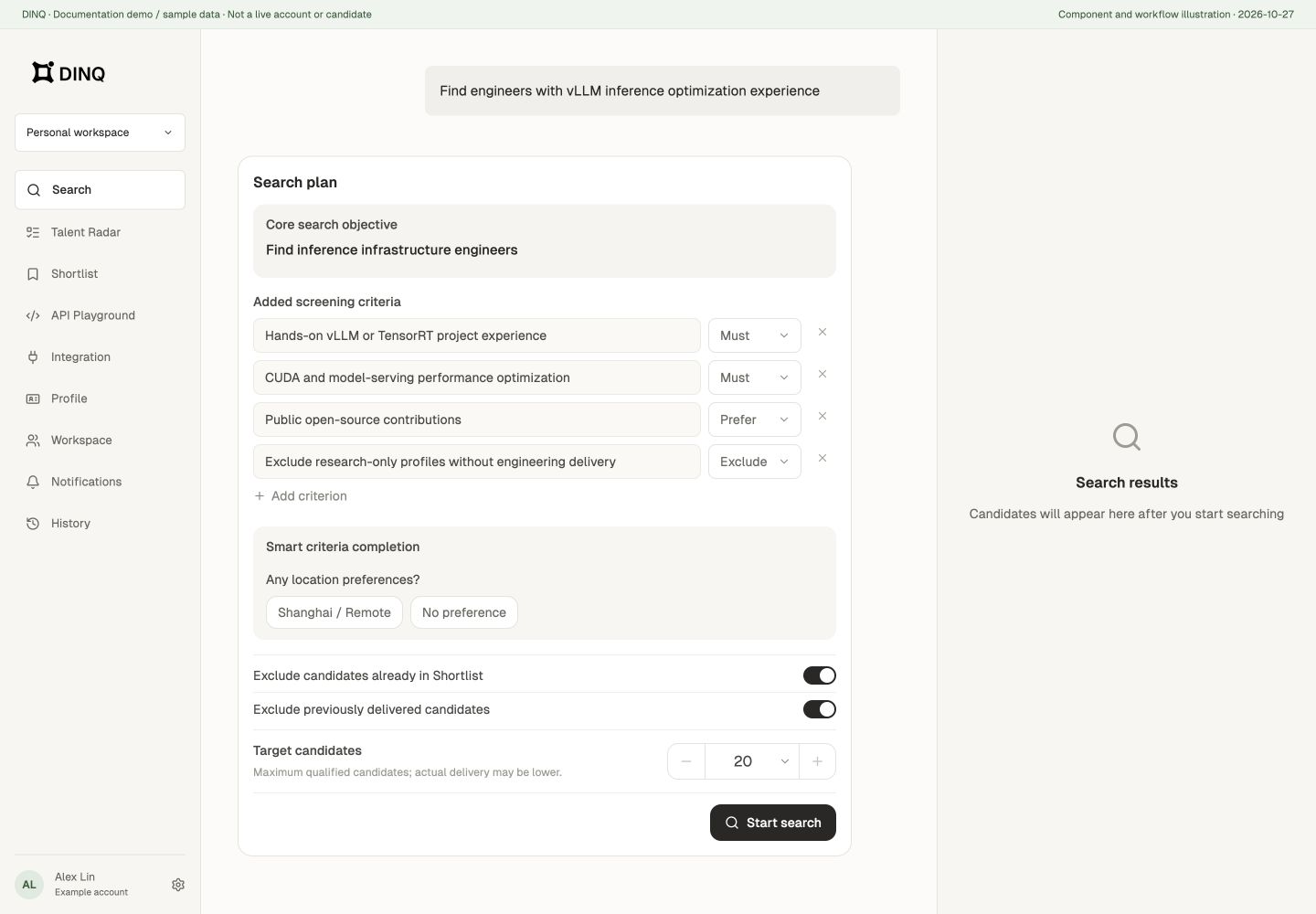
You do not need to answer a fixed set of questions when the requirements are already clear. Review the plan and click Start Search.
Exclude repeat candidates and set the target count
For discovery plans, enable Exclude candidates already in Shortlist and Exclude previously delivered candidates as needed. These cover different sets; one is not a substitute for the other.
Target result count supports presets and custom values from 1 to 200 in the current interface. It is the requested upper limit of qualified candidates, not a guaranteed delivery count or the number of people scanned. Strict criteria or limited sources can produce fewer results.
Verifying a known person uses a different plan from discovering new candidates; not every setting appears for both.
Guided follow-up questions
DINQ may ask questions such as:
- What role or direction are you hiring for?
- What key skills are required?
- Do you care more about open source, papers, startup experience, or big tech experience?
- Where should candidates be located?
- How many candidates do you want?
- Are there any must-have or must-exclude conditions?
Example:
DINQ: Which background matters most?
A. Open-source contributions B. Top conference papers C. Big tech experience D. Startup zero-to-one experience E. I want to type my own answer
The Search Plan is especially useful for:
- First-time DINQ users.
- Users who are not sure how to describe a technical role.
- Teams with a rough direction but no finalized job description.
- Anyone who wants DINQ to help organize their hiring needs.
Refine through chat
If the initial results are not quite right, you can steer DINQ by adding conversational instructions.
Examples:
- "Find more people with active open-source projects."
- "Don’t focus only on big tech backgrounds. Find people from startups who have built similar systems from scratch."
- "Expand the location filter to include Europe and remote options."
DINQ works best as a collaborative tool that adapts as you refine your search through conversation.
Troubleshooting search results
If your results are too broad, too narrow, or not aligned with your role, try one of these adjustments:
- Broaden constraints: Expand location preferences or relax strict years-of-experience requirements.
- Pivot your focus: Tell DINQ whether to prioritize open-source work, research papers, startup experience, or big-tech engineering background.
- Target specific outputs: Add technical keywords, framework names, paper venues, or open-source project names.
- Iterate via chat: Ask DINQ to "find more candidates like [Name]" or "focus less on [Skill] and more on [Skill]."
- Request an expanded search: Ask DINQ to search more broadly or source a larger batch of candidates.